Friday, 9 March 2018

WORLD WIDE WEB


  • Web Pages

        -Each electronic documents on the Web.
        -Can contain text, graphics, animation, audio, and video.


Types of Web Pages

  1.         Static (fixed) : A fixed Web page where visitors all see the same content.
  2.         Dynamic (changing) : A Web page that allows visitors to customize some of all the                    viewed content


  • Web Browser

Image result for web browser

A Web browser or browser is application software that allows users to access and view Web pages.
The purpose of Web browser is to bring information resources to the user.
With an Internet connection established, you start a Web browser.
The browser retrieves and displays a starting Web page.


  • Web Adress

A  Web page has a unique address called a URL (Uniform Resource Locator) or Web address.
Web browser retrieves a Web page using its web address.
Web address consists of :

  1.          Protocol
  2.          Domain name 
  3.          Path
  4.          Web page name

Example : http://www.kmph.matrik.edu.my/fizik/index.html

  •          Protocol             : http://
  •          Domain name    : www.kmph.matrik.edu.my
  •          Path                   : fizik
  •          Web page name : index.html


  • Web page navigation

Most Web pages contain hypertext ot hypermedia links
Hypertext : Links in text-based documents
Hypermedia : Combines text-based links with graphic, audio and video links.


  •  Web searching

A primary reason that people use the Web is to search for specific information, including text, pictures, music and video.
The first step in successful searching is to identify the main idea or concept in the topic about which you are seeking information.

Types of Computer Security Risk


MALICIOUS CODE.

A computer virus is a potentially damaging computer program that affects or infects a computer negatively by altering the way the computer works without the user's knowledge or permissions.

Differences of Malicious Code.


  • Computer virus.


Attached itself to a program or file which cannot spread without human action.
When we run or open a file in which virus is present then it starts effecting and starts spreading.


  • Worm.


Worm is similar to virus but spreads without human action.
It gets multiplied or copied itself into hundred or thousands in number.
Spread itself into other computers through mail or address box.


  • Trojan Horse.


Similar to virus and worm but it does not spread or reproduce
It looks similar to a software but will actually damage once installed or run it.
Can cause severe damage such as deleting files.


  • UNAUTHORIZED ACCESS AND USE.

Related image

                                         
Unauthorized access is when someone gains access to a website, program, server, service, or other system using someone else's account or other methods. For example, if someone kept guessing a password or username for an account that was not theirs until they gained access it is considered unauthorized access.Unauthorized access could also occur if a user attempts to access an area of a system they should not be accessing. When attempting to access that area, they would be denied access and possibly see an unauthorized access message.

Some system administrators set up alerts to let them know when there is an unauthorized access attempt, so that they may investigate the reason. These alerts can help stop hackers from gaining access to a secure or confidential system. Many secure systems may also lock an account that has had too many failed login attempts.


  • HARDWARE THEFT

  Image result for hardware theft
Hardware Theft- is the act of stealing computer equipment. Hardware Vandalism- is the act of defacing or destroying computer equipment.


  • SOFTWARE THEFT.

     Image result for software theft
Software theft. (legal) The unauthorized duplication and/or use of computer software. This usually means unauthorized copying, either by individuals for use by themselves or their friends or, less commonly, by companies who then sell the illegal copies to users.


  • INFORMATION THEFT

        Image result for information theft

Information theft occurs when someone steals personal or confidential information. If stolen, the loss of information can cause as much damage as hardware or software  theft.


  • SYSTEM FAILURE.

Image result for system failure
A system failure can occur because of a hardware failure or a severe software issue, causing the system to freeze, reboot, or stop functioning altogether. A system failure may or may not result in an error being displayed on the screen. The computer may shut off without warning and without any error message. If an error message is displayed, it often is displayed as a Blue Screen of Death error.

Risk of Security Measure


  • DATA BACKUP.

Image result for data backup

Is the result of copying or archiving files and folders for the purpose of being able to restore them in case of data loss.


  • CRYPTOGRAPHY.

                                   Image result for cryptography

Technology of encoding information so it can only be read by authorized individuals.


  • ANTI-VIRUS

                            Image result for ANTIVIRUS

Anti-virus software is a program or set of programs that are designed to prevent,search for, detect and remove software viruses and other malicious software like worms, viruses,trojan horse adware, and more.


  • ANTI-SPYWARE

                                Image result for antispyware

A typed of malware that is installed on a computer without the user's knowledge in order to collect information about them.


  • FIREWALL

                                Image result for firewall

In computing, a firewall is a network security system that monitors and controls incoming and outgoing network traffic based on predetermined security rules.[1] A firewall typically establishes a barrier between a trusted internal network and untrusted external network, such as the Internet.[2]
Firewalls are often categorized as either network firewalls or host-based firewalls. Network firewalls filter traffic between two or more networks and run on network hardware. Host-based firewalls run on host computers and control network traffic in and out of those machines.

COMMUNICATIONS DEVICE AND TRANSMISSION MEDIA


TYPES OF COMMUNICATION DEVICE


A communication device is a hardware device capable of transmitting an analog or digital signal over the telephone, other communication wire, or wirelessly. The best example of a communication device is a computer Modem, which is capable of sending and receiving a signal to allow computers to talk to other computers over the telephone. Other examples of communication devices include a network interface card (NIC), Wi-Fi devices, and an access point.


  • Dial-up Modem


A communications device that can convert digital signals to analog signals and analog signals to digital signals, so that data can travel along an analog telephone line.


  • Digital Modem (ISDN,DSL,Cable Modem)
A communications device that sends and receives data and information to and from a digital line.


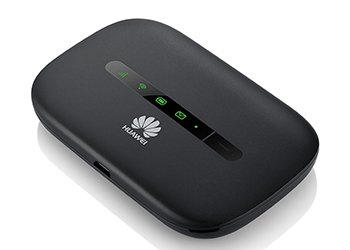
  • Wireless Modem
Some mobile users have a wireless modem that uses the cell phone network to connect to the Internet wirelessly from a notebook computer, a smart phone, or other mobile device.


Next Card

Sometimes called a network interface card, is a communications device that enables a computer or device that does not have built-in networking capability to access a network.


Wireless Access Point


A central communications device that allows computers and devices to transfer data wirelessly among themselves or to transfer data wirelessly to a wired network .


*Wireless access points have high-quality antennas for optimal signals.


Router


A communications device that connects multiple computers or other routers together and transmits data to its correct destination on a network.


Switch


A connection device similar to a hub but more sophisticated, including functionality that allows it to control and manage data transmissions.


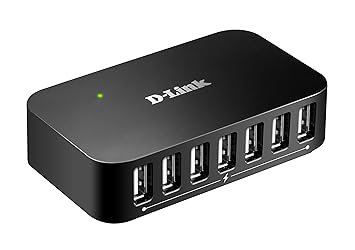
Hub


A connection device that allows multiple connections to the network.


TYPES OF TRANSMISSION MEDIA


Transmission media is a pathway that carries the information from sender to receiver. We use different types of cables or waves to transmit data. Data is transmitted normally through electrical or electromagnetic signals.


An electrical signal is in the form of current. An electromagnetic signal is series of electromagnetic energy pulses at various frequencies. These signals can be transmitted through copper wires, optical fibers, atmosphere, water and vacuum Different Medias have different properties like bandwidth, delay, cost and ease of installation and maintenance. Transmission media is also called Communication channel.


(1) Wired or Guided Media or Bound Transmission Media : Bound transmission media are the cables that are tangible or have physical existence and are limited by the physical geography. Popular bound transmission media in use are twisted pair cable, co-axial cable and fiber optical cable. Each of them has its own characteristics like transmission speed, effect of noise, physical appearance, cost etc. 


Twisted Pair Cable

•Twisted-pair cable consists of one or more twisted-pair wires bundled together.


•Widely used transmission media for network cabling and telephone systems.


Coaxial Cable


Consists of a single copper wire surrounded by at least three layers: 

An insulating material


A woven or braided metal


A plastic outer coating .


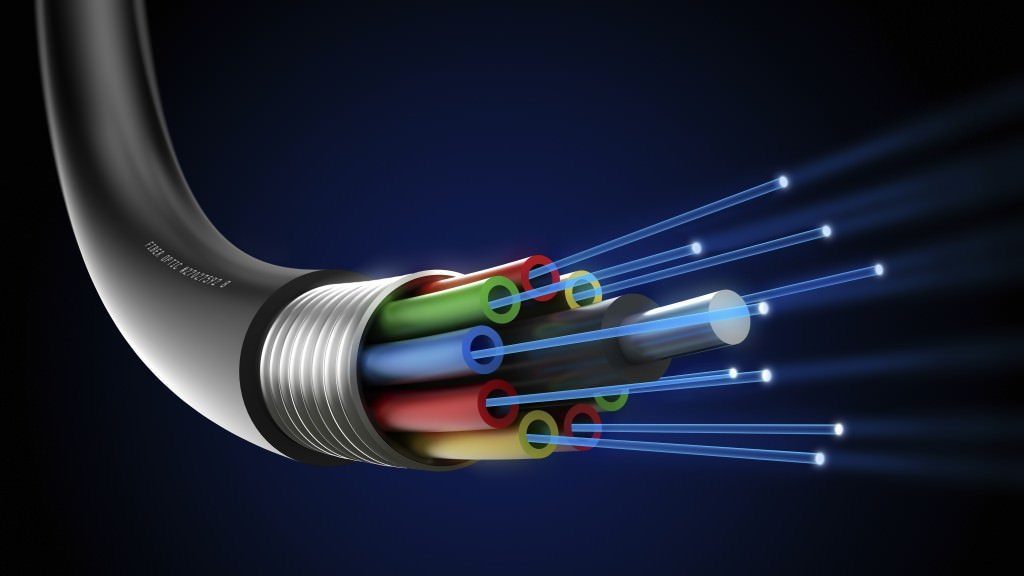
Fiber Optic


A transmission media that uses glass or plastic fiber to carry light (laser) signals.


(2) Wireless or Unguided Media or Unbound Transmission Media : Unbound transmission media are the ways of transmitting data without using any cables. These media are not bounded by physical geography. This type of transmission is called Wireless communication. Nowadays wireless communication is becoming popular. Wireless LANs are being installed in office and college campuses. This transmission uses Microwave, Radio wave, Infra red are some of popular unbound transmission media.


Infrared 


Infrared (IR) is a wireless transmission medium that sends signals using infrared light waves.


Broadcast Radio (Bluetooth, Ultra Wideband (UWB), WiFi, WiMAX) 


A wireless transmission medium that distributes radio signals through the air over long distances such as between cities, regions, and countries and short distances such as within an office or home.


Cellular Radio (2G,3G,4G) 


A form of broadcast radio that is used widely for mobile communications, specifically wireless modems and cell phones


Microwave 


Microwaves are radio waves that provide a high-speed signal transmission.


* Microwave transmission, often called fixed wireless, involves sending signals from one microwave station to another.


Communications Satellite 


Is a space station that receives microwave signals from an earth-based station, amplifies (strengthens) the signals, and broadcasts the signals back over a wide area to any number of earth-based stations.







ADVANTAGES AND DISADVANTAGES OF INTERNET

Related image

Overview of Internet

Overview of Internet.

Internet is defined as an Information super Highway, to access information over the web. However, It can be defined in many ways as follows:
Internet is a world-wide global system of interconnected computer networks.
Internet uses the standard Internet Protocol (TCP/IP).
Every computer in internet is identified by a unique IP address.
IP Address is a unique set of numbers (such as 110.22.33.114) which identifies a computer location.
A special computer DNS (Domain Name Server) is used to give name to the IP Address so that user can locate a computer by a name.
For example, a DNS server will resolve a name http://www.tutorialspoint.com to a particular IP address to uniquely identify the computer on which this website is hosted.
Internet is accessible to every user all over the world.

Evolution
The concept of Internet was originated in 1969 and has undergone several technological & Infrastructural changes as discussed below:
The origin of Internet devised from the concept of Advanced Research Project Agency Network (ARPANET).
ARPANET was developed by United States Department of Defense.
Basic purpose of ARPANET was to provide communication among the various bodies of government.
Initially, there were only four nodes, formally called Hosts.
In 1972, the ARPANET spread over the globe with 23 nodes located at different countries and thus became known as Internet.
By the time, with invention of new technologies such as TCP/IP protocols, DNS, WWW, browsers, scripting languages etc.,Internet provided a medium to publish and access information over the web.

Sunday, 4 March 2018

Computer Ethics and Security


Rules of Netiquette
Rule 1: Remember the human
Rule 2: Adhere to the same standards of behavior online that you follow in real life
Rule 3: Know where you are in cyberspace
Rule 4: Respect other people's time and bandwidth
Rule 5: Make yourself look good online
Rule 6: Share expert knowledge
Rule 7: Help keep flame wars under control
Rule 8: Respect other people's privacy
Rule 9: Don't abuse your power
Rule 10: Be forgiving of other people's mistakes

CLICK to know more about rule of netiquette
http://www.albion.com/netiquette/corerules.html


Areas of computer coverage

Information accuracy

do not assume all the information on the web is correct
users should evaluate the value of a web page before relying on its content.
be aware that the organization providing access to the information may not be the creator of the information.


Green computing
Green computing is the environmentally responsible and eco-friendly use of computer and their resources.
involves reducing the electricity and environmental waste while using a computer.
society has become aware of this waste and is taking measures to combat it.


Codes of conduct
written guideline that helps determine whether a specific action is ethical/unethical or allowed/not allowed.


Information privacy


The right of individuals and companies to deny or restrict the collection, use, and dissemination of information about them.
the privacy of personal information and usually relates to personal data stores on computer system.
the need to maintain information privacy is applicable to collectes personal information such as medical records, financial data, criminal records, political records, business related information or website data.


Intellectual property
unique and original works such as ideas, inventions, literary and artistic works, processes, names and logos.


  •  PATENT.

                                           Image result for patent

A set of exclusive rights granted by a government to an inventor or applicant for a limited amount of time


  • TRADEMARK


           Image result for trademark
 A word,phrase,symbol,design,combination of letters or numbers or other device that identifies and distinguishes products and services in the marketplace.


  • COPYRIGHT 


     Related image

                             
Protection provided to the authors of original works and includes such things as literary,dramatic,musical.artistic and certain other intellectual creations,both published and unpublished


Type of Website

PORTAL A web site that offers variety of internet services from single, convenient location. Example : Yahoo.com, MSN.com ...